


Consider this hypothetical situation: a manufacturer schedules installation of a new machine, assigns operators, and plans its first production run. During setup, the team discovers that the agreed file-transfer method requires a network connection at the manufacturing equipment. Nobody arranged the connection. The equipment has arrived, but the planned workflow is not ready.
That gap is why manufacturing equipment IT planning belongs before purchase approval. Reviewing the surrounding technology early helps clarify costs, responsibilities, and testing before installation day. It also gives everyone time to resolve requirements that the equipment quote may leave to the buyer.
Delivery Day and Production Readiness Are Different Milestones
Delivery confirms that the machine is on site. Physical installation gets it positioned and connected according to the manufacturer’s requirements. Production readiness goes further: trained employees must be able to complete the intended work using the agreed tools and information.
The technology involved depends on the machine and how your business will use it. Not every machine needs internet access, cloud services, or a connection to business management software. Some workflows are largely self-contained. Others depend on supporting computers, production files, or communication with another system. Establish which situation applies before assuming the installation includes everything.
What to Ask Before Approving the Purchase of the Manufacturing Equipment
Request written requirements for the exact equipment configuration and intended workflow. Have operations, the vendor, and IT review these questions together.
What connections does the equipment actually need?
Ask which connections are required, which are optional, and what each supports. A local network connection does not automatically mean the machine needs internet access. IT should review the planned location and any cabling or network changes before the delivery date is committed.
Are the computer, operating system, and licenses included?
Confirm whether the quote covers any separate programming or operator workstation and its required software. Ask the software provider to approve the proposed computer for the intended workload. For example, Mastercam’s computer recommendations distinguish basic work from more demanding programming and simulation. Those recommendations apply to Mastercam, not every machine.
Are there subscriptions or recurring support fees?
Separate one-time purchases from renewals, support agreements, and optional services. Ask what happens if a subscription ends. The answer matters when comparing bids and planning the equipment’s ongoing operating budget.
How will operators receive files and job information?
Agree on where approved production files, instructions, and job details will come from. Confirm the supported delivery method and who maintains the current version. Operators should not have to invent that process during installation.
Must the manufacturing equipment exchange information with existing systems?
Specify what information must move, in which direction, and how often. If a connection to scheduling or business management software is needed, involve that software provider. Confirm compatibility, required features, licensing, and implementation costs rather than assuming an advertised integration covers your workflow.
Will the vendor need remote access?
Agree on the purpose, approval process, and method before setup. NIST’s guidance for operational technology, which includes industrial equipment, recommends justified remote access limited to business needs. Have IT and the vendor plan access that respects site safety and security requirements.
Who installs, configures, tests, and supports each component?
Ask for named owners and explicit exclusions. “Installation included” needs a defined scope, especially when several companies provide parts of the solution.
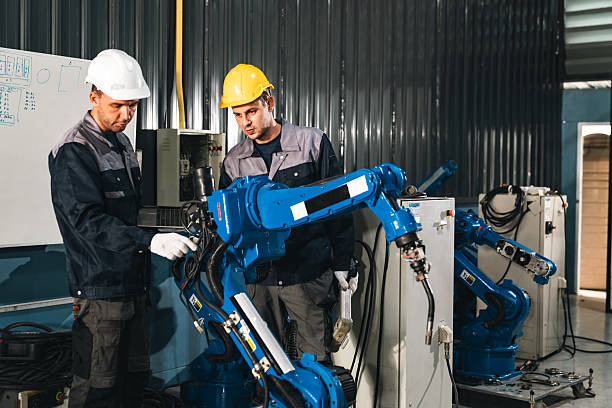
Who Owns the Work Between the Manufacturing Equipment and the Network?
Choose one internal coordinator to track decisions and unresolved requirements. Operations defines the production workflow; equipment, software, and IT specialists agree on their respective work. An IT provider does not automatically own machine programming, industrial controls, equipment safety, or manufacturer-specific configuration.
These boundaries can be explicit in manufacturer documentation. Haas’s networking documentation distinguishes its machine networking responsibilities from the customer’s computers and network. Use the applicable vendor’s documentation to settle boundaries for your purchase. The examples below are assignments to agree upon, not universal rules.
| Work to Assign | Possible Participants | What to Confirm |
|---|---|---|
| Machine setup and configuration | Equipment vendor or qualified specialist | Included work, exclusions, and site requirements |
| Network and supporting computers | Internal IT or IT provider | Connections, equipment, and installation dates |
| Software and system connections | Software provider, vendor, and IT | Licenses, compatibility, and testing responsibilities |
| Workflow and production acceptance | Operations with relevant providers | Representative job, acceptance criteria, and signoff |
Budget for the Technology Around the Manufacturing Equipment
Build the project budget from the written requirements, not just the equipment price. Depending on the installation, additional costs could include cabling, network changes, workstations, licenses, integration work, setup labor, and ongoing support. Every purchase will not need every item.
Mark each requirement as included, separately quoted, or still unresolved. Assign an owner to obtain missing estimates before approval. Confirm delivery times for supporting equipment and availability for installation work. A complete budget should show both initial costs and recurring commitments.
Agree on What “Ready for Production” Means
Define acceptance criteria before installation, then schedule a representative workflow test with operations and the relevant vendors. Follow manufacturer guidance and site safety procedures. Technology checks support, but do not replace, required equipment commissioning or safety acceptance.
Depending on the workflow, an authorized operator might access the required software and transfer and open an approved production file. The team might also verify required communication with another system and approved vendor support access. Include only checks relevant to the installation.
Record the results, unresolved issues, and who can approve production use. Confirm support contacts and escalation responsibilities. A successful demonstration should show the agreed workflow works, not simply that the machine powers on.
A Short Checklist Before Installation Day of your New Manufacturing Equipment
Before scheduling customer orders around the new equipment, confirm that these preparations have owners and completion dates:
- Written vendor requirements received.
- IT review completed.
- Required connections and supporting equipment arranged.
- Licenses and recurring costs confirmed.
- Responsibilities and support contacts documented.
- Installation and testing scheduled.
- Production acceptance criteria agreed upon.
Early coordination helps protect the value of the equipment investment. Include IT while the purchase can still be clarified and the supporting work scheduled. The goal is a production team that can use the machine as planned, with clear ownership when questions arise.
Onsite Computing’s IT project planning and consulting can support those technology discussions. Based in Corona, OSC serves businesses throughout the Inland Empire and Orange County.
Planning New Manufacturing Equipment or Expanding Production?
Involve Onsite Computing before your next equipment purchase. Discuss the network, computers, and software your installation will depend on, and coordinate technology requirements with your team and vendors.
Frequently Asked Questions About Equipment IT Planning
During vendor evaluation, before the purchase is finalized. Share the proposed configuration, installation location, and intended workflow so supporting requirements can influence the scope, budget, and schedule.
Request a written scope stating what installation covers and what your business must supply. Specifically clarify supporting computers, network work, software, testing, and responsibility for resolving connection problems.
No. That depends on the equipment and the workflow you need. Define the information exchange first, then ask the relevant providers whether a supported connection is necessary and available.
